
Recurring invoice software for retainers and repeat client work
Generate recurring invoices as drafts, review before sending, track what's still unpaid, and keep reminders tied to real delivery, all from one focused billing workspace.
Free plan. No credit card required.
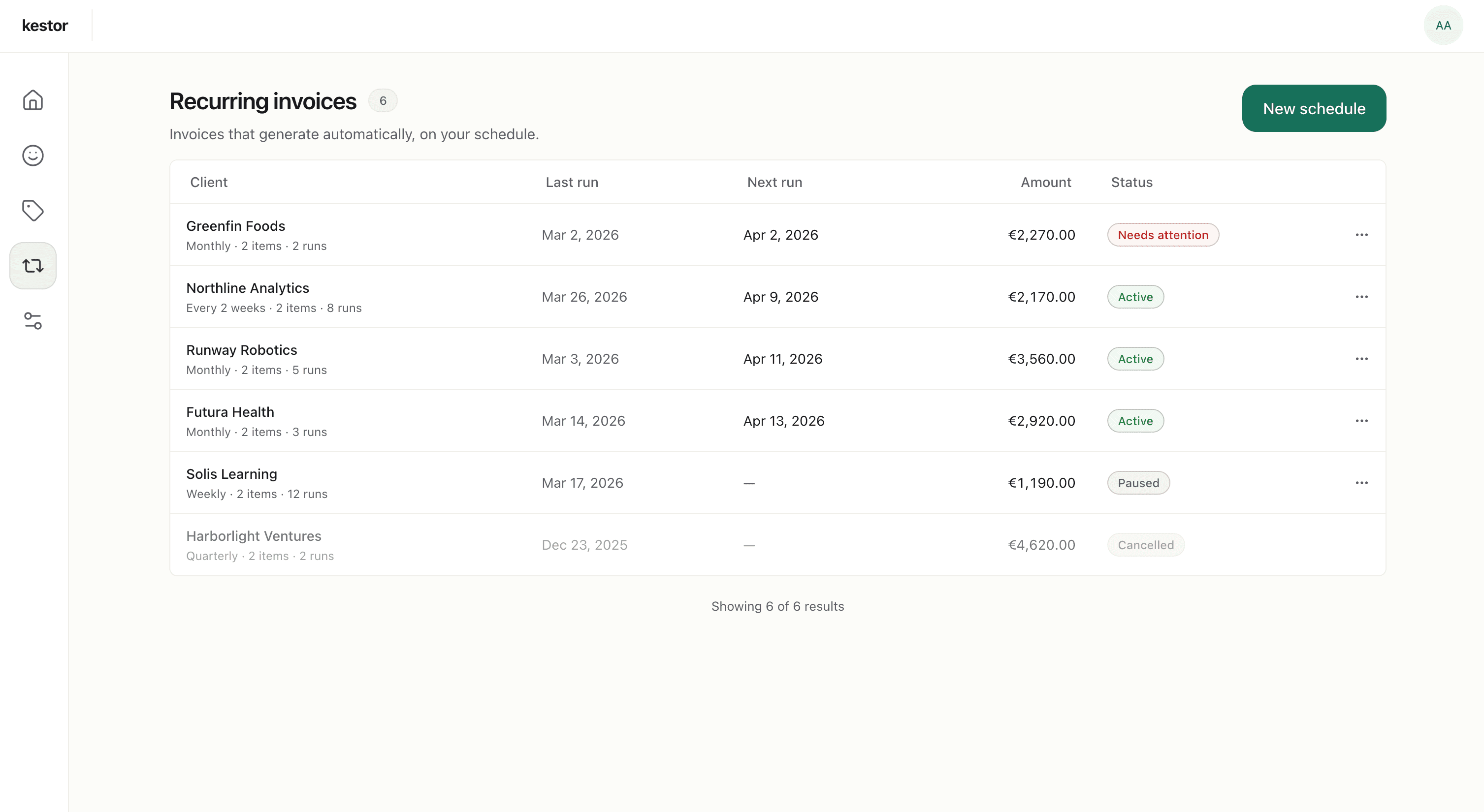
Recurring billing
Recurring billing should save time without giving up control
For ongoing client work, retainers, and repeat services, billing often turns into the same invoice rebuilt over and over again, or a fully automated setup that feels too risky to trust. Kestor gives you a cleaner middle ground: recurring schedules create draft invoices each cycle, so repeat billing stays efficient while you stay in control. When those invoices need follow-up after sending, see invoice reminders.
Repeat work, handled properly
When client work repeats, your billing workflow should not start from zero every month. Kestor lets you set recurring schedules for ongoing work, then generates a draft invoice each cycle with the structure already in place.
Draft-first control
Recurring invoices save time, but they become risky when they go out without context. Kestor creates recurring invoices as drafts first, so you can check details before issuing them.
Follow-up that makes sense
Automatic follow-up should only start after an invoice has actually been sent. Kestor keeps reminders delivery-aware, so recurring billing does not create reminder noise for invoices that were never issued.
Draft-first control
Review before anything goes out
Recurring invoices are useful because they save time. They become dangerous when they send without context. Kestor creates recurring invoices as drafts first, so you can check dates, amounts, client details, and terms before issuing them.
- Review each recurring invoice before sending.
- Catch changes before they reach the client.
- Stay efficient without going fully hands-off.
Repeat work, handled properly
Stop rebuilding the same invoice every cycle
When client work repeats, your billing workflow should not start from zero every month. Kestor lets you set recurring schedules for ongoing work, then generates a draft invoice each cycle with the structure already in place.
- Set recurring schedules for retainers and repeat services.
- Generate draft invoices automatically each cycle.
- Keep repeat billing consistent without repetitive admin. For freelancer-specific use cases, see invoicing software for freelancers.
Visibility after sending
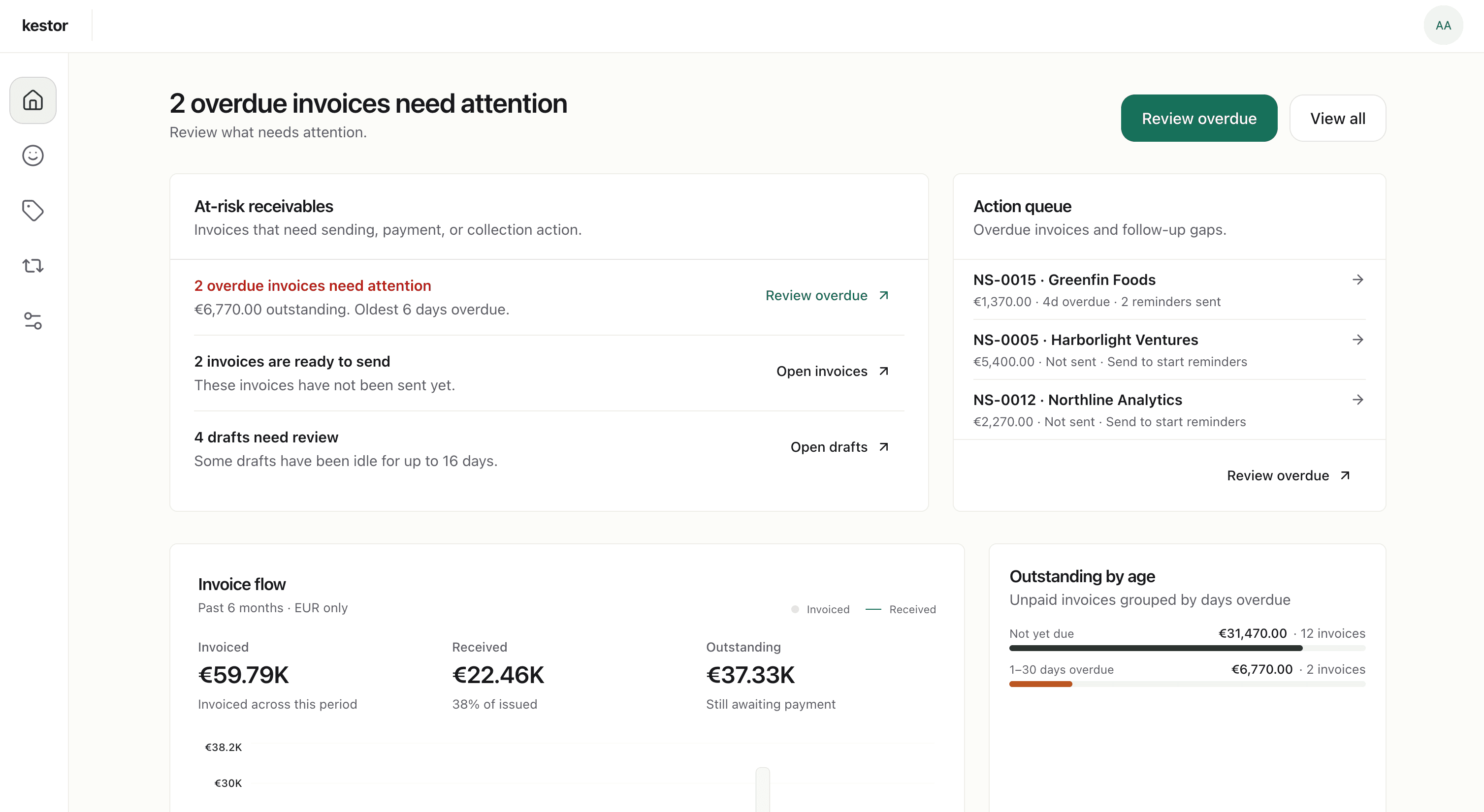
Keep recurring invoices visible after they go out
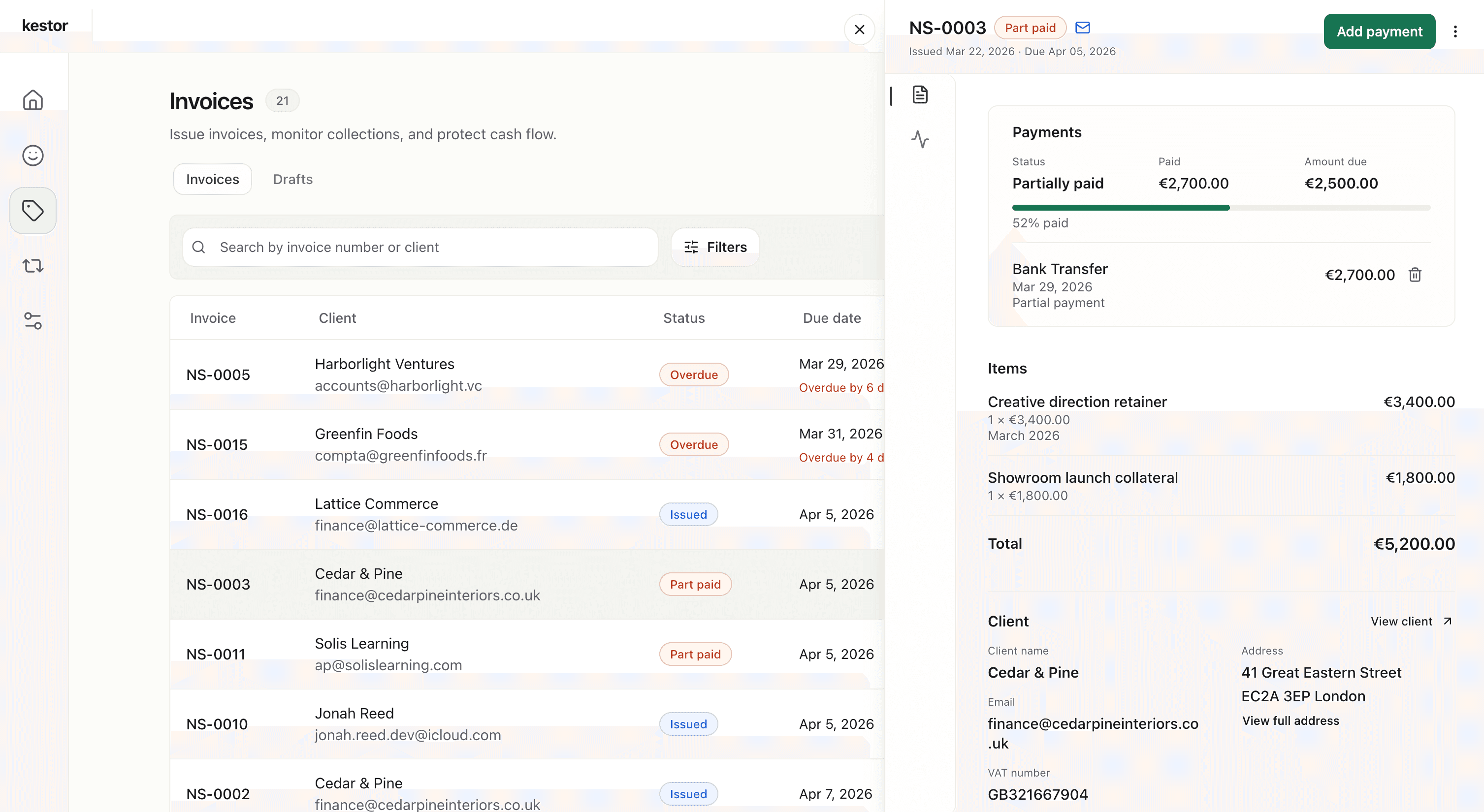
Recurring billing is not just about generating invoices. You still need to see what was sent, what is overdue, what has been part-paid, and what has already been settled. Kestor keeps that visibility in the same workspace.
- Track draft, sent, part-paid, paid, and overdue invoices.
- See outstanding balances and upcoming due dates at a glance.
- Log partial and full payments as they arrive.
Follow-up that makes sense
Reminders stay tied to delivery, not guesswork
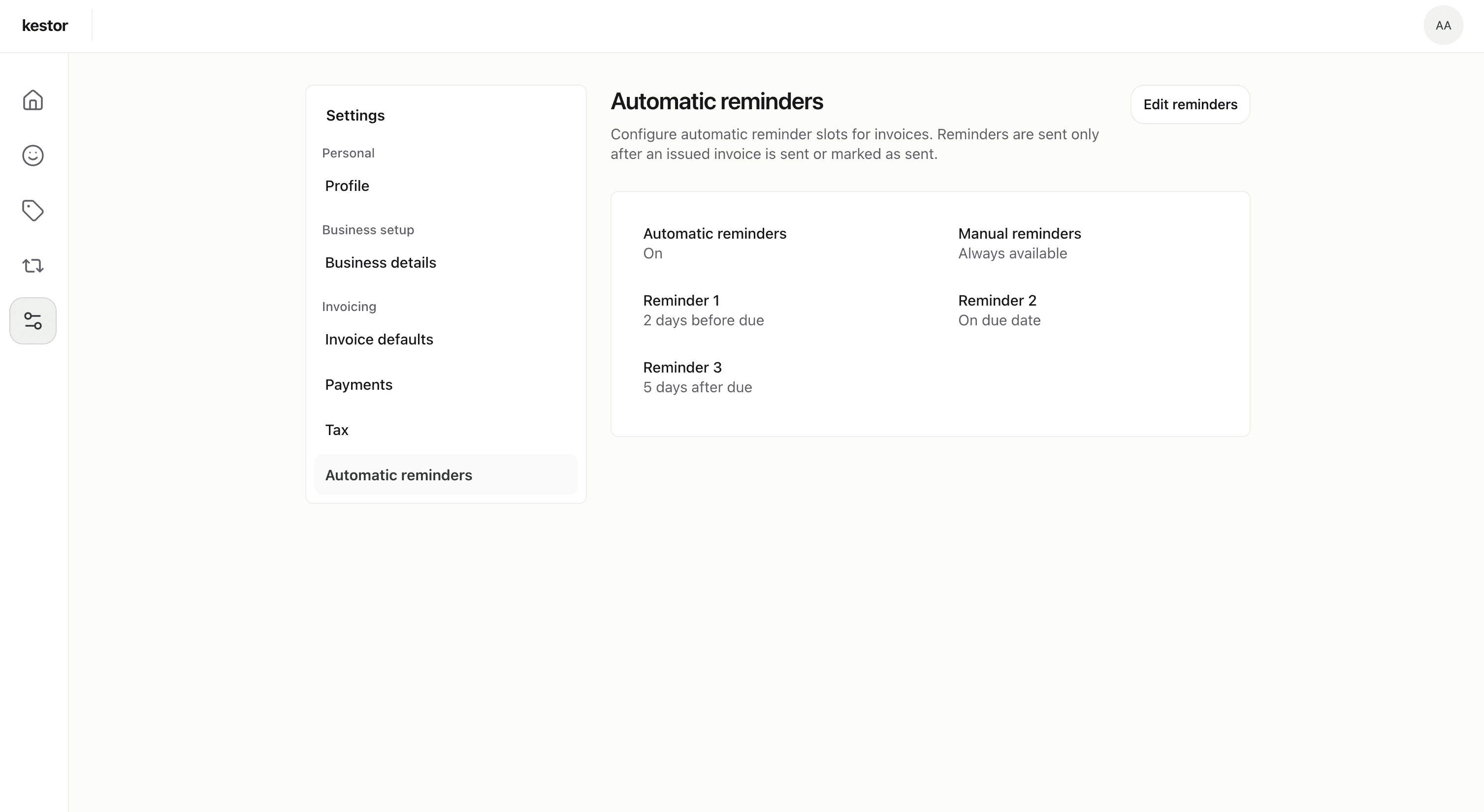
Automatic follow-up should only start after an invoice has actually been sent. Kestor keeps reminders delivery-aware, so recurring billing does not create reminder noise for invoices that were never issued.
- Automatic reminders begin only after sent state or delivery.
- Manual reminders remain available when needed.
- Reminder timing can be configured once and reused across the workflow. See invoice reminders for the dedicated reminders page.
Why Kestor for recurring billing
Built for recurring invoicing without accounting-software sprawl
Kestor helps recurring billing stay efficient, visible, and under control without turning the product into a full accounting or subscription system.
Efficient by default
Set the schedule once and let recurring draft generation remove repetitive setup work.
Still under your control
Review before issuing, so repeat billing stays accurate and client-ready.
Connected to the full workflow
Recurring invoices, payment tracking, and reminders stay in one place instead of being scattered across separate tools.
A better fit for repeat client billing
Recurring retainers
Ongoing services
Reminder follow-up
Kestor overview
Feature summary
Everything recurring billing needs, and nothing extra
Kestor keeps recurring invoicing tied to the broader receivables workflow, from draft generation to payment follow-up.
Recurring schedules
Set up repeat billing for ongoing work and generate draft invoices each cycle.
Draft-first invoicing
Review recurring invoices before issue and delivery.
Professional PDF output
Send polished invoices that look clear, credible, and client-ready.
Payment tracking
See what is still open, overdue, due soon, or settled from one workspace.
Automated reminders
Configure reminder timing once and let follow-up begin only after actual delivery.
Client management
Keep payment details, recipient emails, defaults, and invoice history attached to each client.
Comparison
Why not use templates or full accounting software?
Kestor is for recurring billing that needs speed, visibility, and review without becoming either manual busywork or accounting software sprawl.
Manual templates
They work for occasional invoices, but repeating the same billing setup every cycle creates unnecessary admin and increases the chance of mistakes.
Fully automated systems
They can save time, but they often remove the review step that helps you catch changes before an invoice reaches a client.
Full accounting platforms
They may be useful if you need bookkeeping and finance administration, but they are often heavier than necessary when the real need is recurring invoicing and payment follow-up.
Kestor
Kestor gives you recurring draft generation, review before sending, payment visibility, and reminders in one focused workflow.
FAQ
Recurring billing FAQs
These answers cover the control, review, and payment-tracking questions that usually come up when teams compare recurring invoice software.
How does recurring invoice software work in Kestor?
Kestor lets you create recurring schedules for repeat client work. Each cycle generates a draft invoice with the structure already in place, so recurring billing saves time without becoming fully hands-off.
Are recurring invoices sent automatically?
No. Kestor uses a draft-first workflow. Recurring schedules generate draft invoices for review before issue and delivery, which helps you catch changes before anything reaches the client.
Can I review recurring invoices before sending them?
Yes. Review is central to the recurring workflow in Kestor. You can check dates, amounts, client details, and payment instructions before sending each invoice.
Does Kestor track payments for recurring invoices too?
Yes. Recurring invoices stay inside the same invoicing workspace, so you can track sent, part-paid, paid, and overdue states and keep reminders tied to real delivery.
Make recurring billing easier, without putting it on autopilot
Generate repeat invoices as drafts, review before sending, and keep payments and reminders visible from one focused workspace.
Free plan · No credit card required